A letter arrives with your name on the envelope. You ought to be able to read it before deciding whether to show it to anyone else. For a blind reader handed a sheet of print, that order can be reversed: first find someone willing to read it, then discover whether it was something you wanted to share. A phone that reads the page aloud can give that decision back to you. A service that sends the photograph elsewhere raises a second question: who else has now seen the letter?
Blind readers have a right to accessible information whether or not they use AI. Where the only copy is on paper, a camera can help today. Where a picture needs explaining, a newer generation of assistants lets the reader ask for a particular detail instead of listening to whatever the software chooses to describe. The distinction matters to anyone deciding which tool to reach for. It matters just as much to the organisations sending out those letters.
One photograph, two very different jobs
Look at the tea packet on the glass table below. The curved frame of the table is easy to describe; a foot at the edge might catch your eye. Neither detail helps the photographer choose a cup of tea. The variety is printed in smaller letters below the brand: Earl Grey. The photograph belongs to VizWiz, a study in which blind people took their own pictures and recorded their own questions. The reader chose what mattered before a researcher ever saw the image.
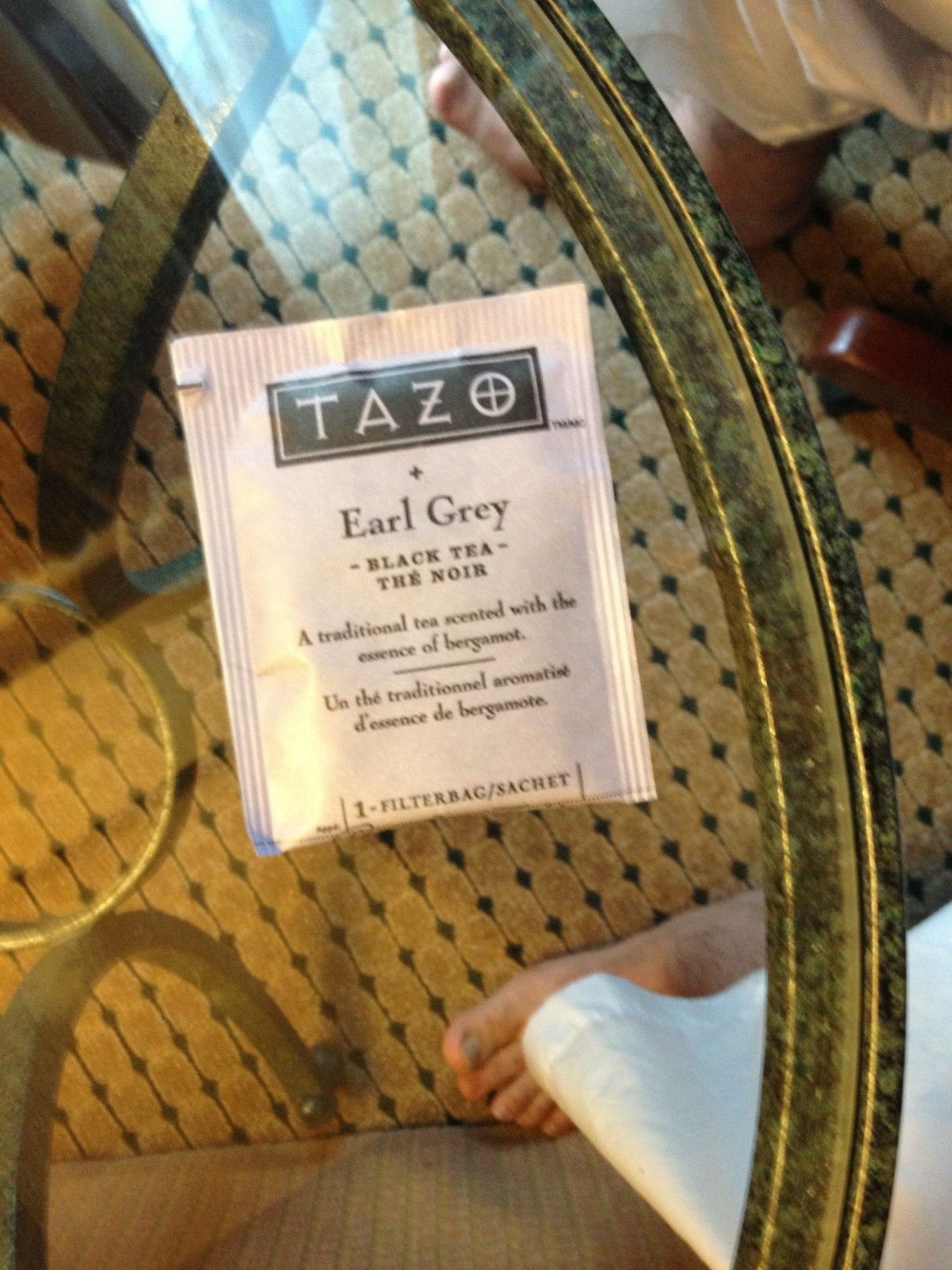
A screen reader such as VoiceOver on iPhone or TalkBack on Android already lets a person move through accessible digital text by touch and speech. No photograph is needed to find the next heading in a well-made document. For a paper label, optical character recognition, usually called OCR, does another job: it turns the marks in the photograph into text that can be spoken. A visual assistant adds a third possibility. After hearing “a packet of tea”, the reader can ask, “What does the line below the brand say?” This time the reader sets the agenda. The answer can still be wrong.
Three tools you can use today
For a printed letter: Microsoft Seeing AI. This free app for iPhone and Android supports Spanish as well as English. Its document mode gives audible cues to help fit the whole sheet into the frame, then reads it aloud. Short Text is better suited to a few words on a packet. A reader can also ask a question about a scanned document. If a letter mentions two appointments, asking for the dates can save listening through the whole sheet again; reading the relevant lines in full preserves which date goes with which appointment. Get Seeing AI or read Microsoft’s guide to the different modes.
For print on an Android phone: Google Lookout. Point Text mode at a label to hear the lettering, or use Documents for a full page. The spoken framing instructions are useful when you cannot check by eye whether you have cut off the last line. Lookout supports Spanish for reading text. Google specifies narrower availability for follow-up questions about images: English in the United States, the United Kingdom or Canada. A Spanish speaker choosing the app for print should not assume the same conversation feature is available locally. See Google’s Lookout guide and download link.
For a photograph you want to question: Be My AI, in Be My Eyes. On iPhone and Android, the app can describe a picture and take a follow-up question or another photograph. A reader sorting a family album could ask about the lettering on a shopfront rather than hear a second account of everyone’s clothes. If the lettering is too small, a closer shot supplies new evidence. If the reader would rather speak to someone, the app also offers a volunteer video call. The AI service requires an internet connection. Read the Be My AI guide, including privacy and safety limits.
What blind readers report
In a US survey carried out in 2025, the American Foundation for the Blind identified 290 blind or low-vision respondents who used AI for visual descriptions. Of those users, 93% said they used it to read text and 76% to find details about objects. Reading a label sounds modest beside some of the grander claims made for AI. It was precisely this sort of work that people in the survey were doing. Those percentages tell us about uses among this group; they are neither an adoption rate for blind people generally nor a measure of accuracy. American Foundation for the Blind, Innovation for Access (2026).
The original VizWiz study (CVPR, 2018) collected about 31,000 questions and ten human answers per question. One part of the challenge was deciding whether the picture contained enough information to answer at all. The tea photograph is evidence of what a reader wanted to know. It is not evidence that any of today’s apps correctly read this packet for the person who photographed it.
In a separate study of Be My AI presented at CHI in 2025, researchers interviewed 14 visually impaired users and examined examples of the descriptions. One participant knew the application had invented objects beside her dogs because she knew her own home. Others found the tool useful when choosing clothes. A small interview study cannot rank the apps by accuracy. It does tell us something a product demonstration rarely shows: someone can value a tool and still know when to contradict it.
When the reader needs a second source
For a family photograph, an imperfect description may still start a welcome conversation. For a medicine dose, an error can cause harm. Be My Eyes explicitly advises against using its AI to identify medicines or read dosages. An accessible pharmacy label or a pharmacist is the appropriate source. Asking the same application three times does not give you three independent readings.
Privacy changes the choice, too. Be My Eyes says its AI sends photos and questions for remote processing and advises against submitting sensitive personal or financial information. A screen reader opening an accessible original avoids the need to photograph the document and upload it to a visual-assistance service. A sender can offer accessible text or an accessible electronic document alongside the paper copy, through a channel the recipient chooses. How Be My AI handles pictures and chats.
What readers are still owed
Our conclusion is that visual AI is worth having because it puts more everyday decisions in the reader’s hands. Use text recognition when the question is what the page says; ask a visual assistant when the question is which detail a scene contains; turn to an independent source when the price of a wrong answer is high. None of these choices relieves a publisher, clinic or public office of the responsibility to send information its readers can use.
The blind reader who wants to make tea should be free to point a phone at the packet, hear “Earl Grey” and put the kettle on. The person opening a private letter deserves something more: the freedom to read it without needing the camera in the first place.
Research and further reading
VizWiz Grand Challenge: Answering Visual Questions from Blind People (CVPR, 2018) — the original photographs and questions. Beyond Visual Perception (CHI, 2025) — interviews about help, mistakes and human judgement. Innovation for Access (American Foundation for the Blind, 2026) — reported uses and attitudes to privacy.
Liked this post? Follow this blog to get more.